Disclosure: This post contains affiliate links to VPN services (NordVPN, PrivateVPN, Surfshark). If you sign up through one of the links on this page, AI From Japan may earn a small commission at no additional cost to you. I only recommend VPNs I would be happy to use myself, and the prices shown were verified on each provider’s own pricing page on May 27, 2026. Read our full Affiliate Disclosure for details on every program we participate in.
🗾 Quick answer (for people locked out of their own Japanese accounts):
Most Japanese sites — Rakuten, point services, news, shopping — block you the moment your IP address leaves Japan. A VPN with a server inside Japan gives you a Japanese IP and gets you back in. The big exception is banking, which needs extra care (see the warning below).
- Most reliable — NordVPN: the most Japanese servers (130+ across Tokyo & Osaka), so a stable Japanese IP for shopping, points and services.
- Cheapest that works — PrivateVPN: around US$2/month on the long plan.
- Whole household abroad — Surfshark: unlimited devices from ¥308/month.
All three have a 30-day money-back guarantee, so you can test access to your Japanese services risk-free.
Last Updated: May 28, 2026 · Written from Osaka by Ryuyan
When you live in Japan, you don’t think twice about it. You pay your Rakuten card bill, top up your points, check a delivery, read the news. Then you move abroad — or you’re stuck overseas longer than planned — and suddenly half of those sites just… stop working.
I’m in Osaka, so this isn’t a daily headache for me. But it’s one of the most common things friends message me about after they leave: “Ryuyan, why can’t I log into Rakuten anymore? Is my account broken?” Your account is fine. Japan is simply checking where you’re connecting from, and locking the door when the answer isn’t “Japan.”
A VPN fixes most of this in about five minutes. But there’s one category — banking — where you need to be careful, so I’m putting that warning before the how-to, not buried at the bottom. Let’s do this properly.
What actually stops working when your IP leaves Japan
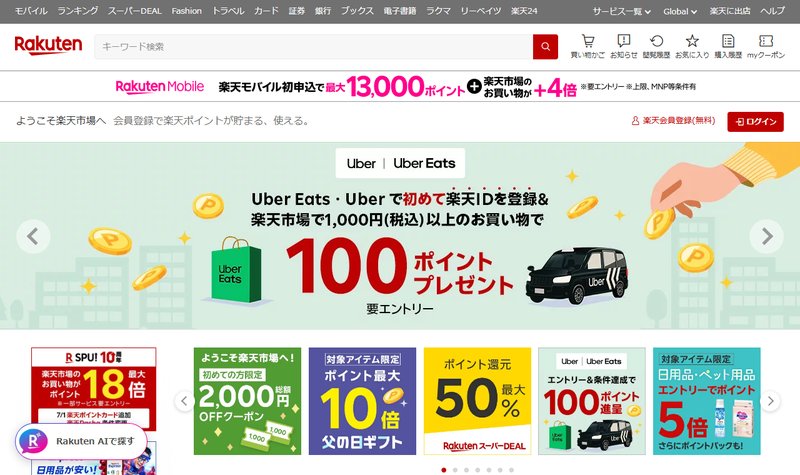
Japanese services check your IP address — the marker that reveals which country you’re connecting from. Outside Japan, a lot of them simply refuse you. Here’s roughly what you’ll run into, in order of how easy it is to fix:
- Shopping & accounts (Rakuten, Yahoo! Japan, Mercari): often blocked or degraded abroad. A Japanese IP usually restores them.
- Points & rewards (Rakuten points, dPoint, PayPay balance views): the web dashboards frequently geo-check.
- News, government & tax info pages (furusato nōzei portals, furusato nōzei = Japan’s hometown-tax donation system): some refuse foreign IPs.
- Streaming (TVer, ABEMA, Radiko): hard geo-blocks for licensing reasons.
- Banking (Rakuten Bank, MUFG, SMBC, Japan Post Bank): the trickiest — see the next section before you try anything.
For everything except banking, the fix is the same and it’s simple: get a Japanese IP with a VPN. I’ll cover that in a moment.
⚠️ Read this before you touch your Japanese bank from abroad
This is the part I most want you to get right, because it’s the one that can actually cause you grief. Japanese banks treat a login from an unfamiliar overseas IP — or a known VPN IP — as a possible fraud signal. The realistic risk isn’t a fine; it’s that your account gets temporarily locked and you’re stuck on an international phone call to unlock it.
So do it the safe way:
- Register for official overseas access before you leave Japan. Major banks have dedicated programs for residents going abroad — for example MUFG’s “Global Direct” and SMBC’s “Global Service.” These are the bank-sanctioned way to keep using your account overseas, and they beat any VPN workaround.
- Watch the SMS two-factor trap. Many Japanese banks send the one-time code to a Japanese mobile number. If you’ve cancelled your Japanese SIM, you may not receive it — sort out an authentication method (app-based, or keep a number active) before you go.
- If you do use a VPN for banking, keep it consistent. A stable Japanese IP looks less alarming than hopping between random servers mid-session. But understand a VPN is a supplement here, not a substitute for the official overseas-access registration.
💡 My honest take: use a VPN freely for Rakuten shopping, points and reading. For actual banking, lean on the official overseas service first and treat the VPN as a backup, not the plan.
How to get a Japanese IP and unlock the rest (about 5 minutes)
- Choose a VPN with Japanese servers. Not all VPNs have them; the three below do. Free VPNs rarely keep working Japanese IPs.
- Install the app and sign in. Works on Windows, Mac, iPhone, Android. All three picks have a 30-day money-back guarantee, so this step is low-risk.
- Connect to a Japan server (Tokyo or Osaka). Wait for “Connected.”
- Clear cookies or use a private window. Old cookies can leak your real location even with the VPN on. This single step fixes most “it still won’t load” cases.
- Open the Japanese site and log in as normal. For shopping and points this is usually all it takes.
The gotcha nobody warns you about: PC beats mobile here
Here’s the detail that trips people up. A laptop or desktop has no GPS, so a Japanese IP address alone is enough to convince most sites you’re in Japan. A phone is different: some Japanese apps check your device GPS, not just your IP — and a VPN can’t fake GPS.
So if a Japanese app on your phone keeps refusing you even with the VPN connected, that’s usually GPS, not the VPN failing. The reliable move:
- Use a desktop browser for Rakuten, point dashboards and account pages — it’s the most consistent combo.
- On a phone, try the website in a browser rather than the app, and check the app’s location permission.
Which VPN should you use?
For accessing Japanese services, the single thing that matters most is a reliable, well-populated set of Japanese servers — if one IP gets flagged, you want another to switch to. Here’s how I’d choose for your situation. All three are services I’d happily use myself.
🥇 NordVPN — Best for: the most reliable Japanese IP
NordVPN runs the largest Japanese network of the three — independent guides cite 130+ servers across Tokyo and Osaka. More servers means if one Japanese IP is flagged by a site, you just hop to the next. It’s also fast enough that pages and dashboards load instantly. When I checked its Japanese pricing on May 27, 2026, the top “Complete” plan showed ¥610/month on the two-year term; for simply getting a Japanese IP you only need the cheaper Basic tier (around ¥430–470/month per Japanese review sites). 10 devices, 30-day money-back guarantee.
💸 PrivateVPN — Best for: the tightest budget
If you just need an occasional Japanese IP to check Rakuten or pay a bill, PrivateVPN is the cheapest one I’d trust over a sketchy free app. Its network is smaller than NordVPN’s, but it keeps Japanese servers. On its pricing page (checked May 27, 2026) the long 36-month plan works out to US$2.00/month (billed $72/year after the intro term), with month-to-month at $9.90. 10 devices, 30-day money-back guarantee. The trade-off is fewer fallback servers if one Japanese IP is blocked.
👨👩👧 Surfshark — Best for: a whole household abroad
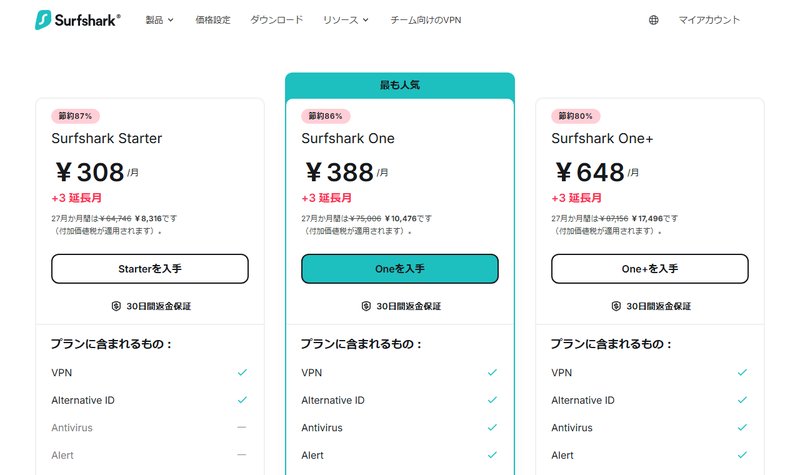
Moved the whole family overseas and everyone still has Japanese accounts to manage? Surfshark allows unlimited devices on one subscription. When I checked its Japanese pricing page (May 27, 2026), the 24-month Starter plan was ¥308/month (billed ¥8,316 for the first 27 months), with a 30-day money-back guarantee.
At-a-glance scorecard
| Criteria (out of 5) | NordVPN | PrivateVPN | Surfshark |
|---|---|---|---|
| Japanese server coverage | ★★★★★ | ★★★☆☆ | ★★★★☆ |
| Stable IP for accounts | ★★★★★ | ★★★★☆ | ★★★★☆ |
| Speed | ★★★★★ | ★★★★☆ | ★★★★☆ |
| Value for money | ★★★★☆ | ★★★★★ | ★★★★★ |
| Devices covered | ★★★★☆ (10) | ★★★★☆ (10) | ★★★★★ (∞) |
“Rakuten” means three different things — don’t mix them up
A lot of confusion online comes from treating “Rakuten” as one website. It isn’t, and each part behaves differently abroad:
- Rakuten shopping & your Rakuten account (rakuten.co.jp): the everyday shopping site and point balance. A Japanese IP via VPN usually restores access.
- Rakuten Pay / QR payments: these are tied to being physically in Japan and to your phone — a VPN won’t make a QR payment work overseas. Plan around that.
- Rakuten TV (streaming): a separate, licence-based geo-block, like TVer or ABEMA — a Japanese server unblocks it for viewing, subject to its terms.
If you only remember one thing: VPN helps with web access and viewing, not with in-person payments.
Still locked out? Troubleshooting
- Clear cookies / use a private window. The most common culprit — old location data overrides your Japanese IP.
- Switch to another Japanese server. The IP you’re on may be flagged; pick a different Tokyo/Osaka one. (This is where NordVPN’s bigger network helps.)
- Use a desktop browser, not the phone app — to sidestep GPS checks.
- Check your 2FA path. If the code goes to a dead Japanese number, fix that before blaming the VPN.
- For banking, stop and use the official overseas service rather than forcing repeated VPN logins that may lock the account.
Is this legal? Using it responsibly
I’m not a lawyer, so here are the plain facts. Using a VPN is legal in Japan and most countries. What this guide is for is accessing your own Japanese accounts and services from abroad — the legitimate “I moved but I still have a Rakuten account and a tax bill” situation.
Two honest caveats: some services’ terms don’t formally permit access via VPN from outside Japan, and banks specifically may flag it. Enforcement against ordinary users accessing their own accounts is rare, but be sensible — use the official overseas-banking programs where they exist, and don’t treat a VPN as a way around identity or payment rules.
Before you fly: a 5-minute pre-departure checklist
If you’re reading this before leaving Japan, you’re lucky — a few minutes now saves a lot of pain later:
- ☐ Register for your bank’s overseas access service (MUFG Global Direct / SMBC Global Service, etc.).
- ☐ Sort out 2FA that doesn’t depend on a Japanese SIM you’re about to cancel.
- ☐ Install a VPN with Japanese servers and test it while still in Japan on the 30-day guarantee.
- ☐ Note which of your services are GPS-dependent (use desktop for those).
- ☐ Save your account recovery info somewhere you can reach from abroad.
Frequently asked questions
Why can’t I access Rakuten from outside Japan?
Because the site checks your IP address and sees you’re not in Japan. Connecting to a Japanese VPN server gives you a Japanese IP, which usually restores access to Rakuten shopping and your account.
Will a VPN let me use my Japanese bank abroad?
Sometimes, but cautiously. Banks may flag overseas/VPN logins and lock the account. The safe route is to register for the bank’s official overseas-access service before you leave Japan, and treat a VPN as a supplement.
Why does it work on my laptop but not my phone?
Laptops have no GPS, so a Japanese IP is enough. Some phone apps check device GPS, which a VPN can’t change. Use a desktop browser, or the website instead of the app.
Can I use a free VPN for this?
I wouldn’t rely on one — free VPNs rarely keep working Japanese servers and are slow. Use a paid VPN’s 30-day money-back guarantee, or PrivateVPN’s ~US$2/month plan.
Which VPN has the most Japanese servers?
Of my three picks, NordVPN has the largest Japanese network (130+ servers), which makes it the most reliable for a stable Japanese IP.
Is it safe to enter my passwords over a VPN?
A reputable VPN encrypts your connection, which is fine. As always, type passwords and payment details yourself on the official site — never share them with anyone, including a guide.
Japan-specific verdict
How I’d actually advise you:
- For shopping, points and reading → just get a Japanese IP. NordVPN is the most reliable; PrivateVPN if budget is tight; Surfshark for a whole household.
- For banking → official overseas-access service first, VPN only as a careful backup.
- For in-person QR payments → a VPN won’t help; plan another way.
Test it on the 30-day money-back guarantee while you’re still in Japan, tick off the pre-departure checklist, and you’ll keep your Japanese life running from anywhere. 🇯🇵
Related guides
- How to Watch ABEMA & TVer Outside Japan (with a VPN)
- Best VPN for Japan (2026): my full ranked guide
- NordVPN review: is it worth it from Japan?
- NordVPN vs ExpressVPN: which wins in Japan?
Related Articles You Might Find Useful
If this guide was helpful, here are a few more from AI From Japan covering related topics:
- NordVPN with Rakuten & Japanese Banks: Accessing Your Accounts from Abroad
- How to Watch ABEMA & TVer Outside Japan (with a VPN) in 2026
- Best VPN for Japan 2026: Top 5 Picks for Expats, Travelers & Digital Nomads
- Best Cheap VPN for Japan in 2026 (Budget Picks Tested)
About the author
I’m Ryuyan Kimura, a content blogger based in the Kansai region of Japan. I review AI tools, VPNs, and password managers for English-speaking expats and Japanese learners. Prices and public sites in this guide were checked from my own connection in Osaka; bank-specific behaviour is drawn from the banks’ published services and reports by people abroad, which I cite inline.
Want the full story? Read my About page or check our Editorial Standards for how we test products.